

Managing a project often comes with a hidden challenge: effectively managing all the project related files. From project plans to meeting notes, product requirements and team retrospectives, projects generate countless documents. Too often, these files end up scattered across personal folders, shared drives or cloud platforms, making them hard to find when they’re needed most. This disorganization wastes time and creates confusion, especially in fast-moving agile environments.
That’s where Documents for Jira steps in. This powerful app tackles the chaos of scattered documents by helping you safely store all your documents in one centralized and secure place: Jira. With Documents for Jira, teams can upload, create, organize and collaborate on files and folders seamlessly, ensuring everything they need is in one place and just a few clicks away.
What is Documents for Jira and how it works
Documents for Jira is an app (plugin) for Jira Cloud and Jira Data Center, which serves as a document management system (DMS) that allows storing your files in Jira in an easy, structured and secured way. Instead of juggling multiple tools and storage locations, Documents for Jira allows you to manage all your project documents in one place – Jira.
The app adds a new tab on the project dashboard screen of Jira named “Documents”. Under this tab the project users will find all the files related to that project. You can organize them in folders and assign permission for each document to make sure only the right people from the team can access or edit a document.

Key Features at a Glance
- Folder hierarchy: Organize documents with a clear hierarchy
- Create documents of multiple types:
- Files – a file attached along with metadata (title, description, revision number, etc)
- URLs – links to web pages
- Wiki* – documents created and edited within Documents, which can be exported in PDF format
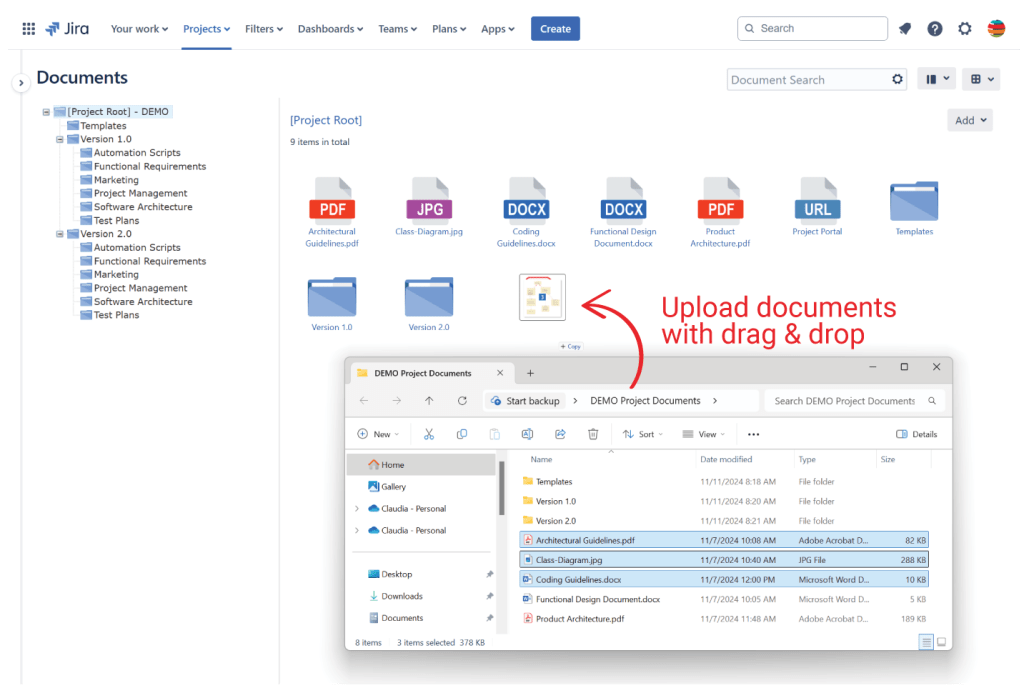
- Upload files and folders with drag & drop: create your folder hierarchy on you local computer and simply upload it with drag & drop
- Controlled access* – ability to set access permissions over individual folders or documents
- Search documents: search for specific documents and folders
- Version history: Automatic versioning with the ability to access and restore old versions
- Lock editing: prevent other users from modifying the document while you are working on it
- Email notifications* – get notified each time a document is modified
- Link documents to Jira issues: link documents to specific Jira issues to make them accessible from the issue screen
- Dashboard gadgets – for easy access and visualization of the new & recently updated documents
* – currently available on Data Center only
1. Folder hierarchy
With Documents for Jira you can organize your files using a clear hierarchical structure. Create folders and sub-folders to categorize documents in the way you want. This structure makes it easy to find and access the files you need, even as your documentation grows over time. No more wasting time searching for the right document — everything is neatly organized and right where it should be.

2. Upload documents of multiple types
In addition to folders, Documents for Jira allows uploading files and posting useful URLs (links to remote documents or web pages).

In addition, on Jira Data Center it allows creating and editing wiki-style documents, which can then be exported in PDF format.
3. Upload files and folders with drag & drop
Organize your folder structure on your local computer beforehand, then easily upload it using drag & drop. Just select the folders and files you want to upload and drag them directly into the middle pane of the Documents page.
4. Search documents
You can easily search for documents and folders by typing a keyword (and then pressing Enter) in the search box available on the Documents tab of the project. The search is performed within the metadata (title, description, author, etc). For more precise results, take advantage of the advanced search options.

5. Version History
Whenever a document is updated—whether it’s the file or its metadata—its internal version is automatically incremented. The previous version’s data is saved in the version history, allowing you to access, download, or restore it anytime.

6. Lock Editing
A Jira user working on a document can prevent others from modifying the document by selecting the Lock Editing option. Optionally, they can leave a message to inform other users who attempt to make changes.

7. Link documents to Jira issues
Documents can be linked to specific Jira issues (and vice versa), ensuring your project files are always directly connected to the relevant work.

For the Data Center version of the app, you can also add document references in Jira fields or comments

8. Setting permissions on individual folders and documents
You can limit access to your documents to a specific list of users or groups. Additionally, you can restrict certain actions—like Edit or Delete—ensuring your documents remain secure and managed according to your needs.

9. Dashboard Gadgets
Documents for Jira comes with two dashboard gadgets:
- New and Recently Updated Documents gadget – to see the documents that were recently created or updated

- Documents Tree gadget – makes the folder structure visible and easily accessible.

On Data Center, besides the two gadgets, you can also use the Activity Stream gadget to see a summary of the actions performed on documents.

For more detailed information on how to use Documents, please watch this video (for Jira Cloud) or this video (for Jira Data Center).
Conclusions
In today’s remote and hybrid work environments, having a single source of truth is more important than ever. Documents for Jira ensures all team members, no matter where they’re located, have access to the latest project-related files. Real-time collaboration tools help bridge time zones and foster better communication.
Documents for Jira is the perfect solution for teams looking to streamline workflows, improve collaboration, and maintain a single source of truth for all project-related information.
About StonikByte
StonikByte is a Gold Marketplace Partner and the author of various apps (add-ons) for Atlassian Jira, which includes:
- Great Gadgets for Jira – a gadgets pack for tracking projects in an agile manner. Includes gadgets like sprint and release burndown / burnup charts, team velocity, issue field sum-up, cycle time, work breakdown structure (WBS) and more.
- Documents for Jira – a document management system for Jira where you can store and manage your project-related files.
- Project Team for Jira – an app that makes visible the project teams, allows extending the user profiles by adding custom fields, generates and displays org-charts.
- DevOps Gadgets for Jira – an app that brings key development insights from your Bitbucket Cloud and GitHub to your Jira dashboards. It provides essential gadgets to help teams stay on top of their DevOps processes.
To find more about StonikByte, please visit https://stonikbyte.com/.
 StonikByte
Leave a comment